RileyLink
Order a RileyLink Compatible Device
Not needed for any pump that supports direct Bluetooth BLE commands: Omnipod 5, Omnipod DASH, Medtrum, Dana or Tandem Mobi
Required when using an older Medtronic pump or Omnipod Eros pods
Time Estimate
- 0 minutes if you plan to use a pump that supports direct BLE communication - you don't need one
- 15-20 minutes to read about RileyLink compatible devices
- 15 minutes to order a device
Summary
- Decide what kind of RileyLink compatible device to buy
- Order your compatible device
FAQs
- What is a RileyLink Compatible Device? RileyLink refers to both the communication protocol and the name of the original device. Community members have created RileyLink Compatible Devices that use the RileyLink protocol. All these devices can be used interchangeably with the Loop app to support Eros and Medtronic use.
- Do I have to buy one? These are open-source hardware devices, but it takes special skills to build them yourself. It is recommended you buy one (or two) if you require it. At the current time, new OrangeLink and EmaLink devices are available for purchase. Used devices are often available on this Facebook Group: Looping in a time of covid. Not needed for Omnipod 5, Omnipod DASH, Medtrum, Dana or Tandem Mobi
- "What happens if I lose my RileyLink compatible device or walk away from it?" Within a half hour, your pump returns to the normal scheduled basal rate
- "Can I swap out RileyLink compatible devices at any time?" Yes, you can. You do not need to start a new pod or rebuild the Loop app. Tap on the pump menu in settings to search for new devices. You can swap between compatible devices.
- "How close does the RileyLink compatible device need to be to me? Do I have to carry it with me?" See RileyLink Compatible Device Range.
What is a RileyLink Compatible Device
The RileyLink compatible device is required to allow your phone to talk to compatible Medtronic and Omnipod Eros pumps. It is not needed for Omnipod 5, Omnipod DASH, Medtrum, Dana or Tandem Mobi.
Details for RileyLink
The RileyLink compatible device is an open-source hardware device that can bridge Bluetooth Low Energy (BLE) to the radio-frequency wireless communication used by compatible Medtronic and Omnipod Eros pumps.
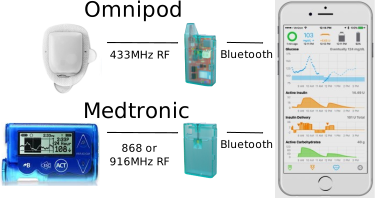
RileyLink Compatible Devices
The RileyLink protocol defines a specific Bluetooth interface and way of opening a Sub-GHz radio channel to pumps. All RileyLink compatible devices follow the RileyLink protocol.
Many Omnipod users have switched to DASH or Omnipod 5 and no longer need a RileyLink device, so the demand is significantly less than it used to be. You can still buy the devices, but there are fewer options.
There are several options. Whichever you choose, have the correct charger and cables or batteries handy and add spare compatible supplies to your diabetes go-bag.
- A Comparison Chart is provided by the GetRileyLink organization for all the RileyLink compatible devices listed below
- RileyLink
- Designed by Pete Schwamb
- Rechargeable battery (max 36 hours per charge)
- No longer available new; check this Facebook Group for used ones: Looping in a time of covid
- OrangeLink
- Designed by Vic Wu, available from GetRileyLink
- Uses 2 AAA batteries, batteries typically last weeks or more, depending on the batteries/pump type
- Works with either Omnipod or Medtronic
- Uses new chipsets, reported to have a longer range
- Matches Apple AirPod form factor, so you can use AirPod cases
- EmaLink
- Designed by Sorin Kupas-Spunei to increase range, offer smaller sizes
- Rechargeable battery (various case/battery sizes available)
- Micro/Nano: 2 to 3 days
- Standard: 6 to 7 days
- Maxx: 12 to 14 days
- Must order either Omnipod or Medtronic version
- This EmaLink Information includes photos of various EmaLink configurations as well as photos showing relative sizes of EmaLink, OrangeLink and RileyLink
- In North America, available from EmaLink.us
More information
There is an entire FAQs page on RileyLink Compatible Devices.
Sections of interest include:
- Firmware Update information on the OrangeLink
Waiting for your RileyLink Compatible Device
While you are waiting for the RileyLink compatible device to arrive, you can proceed with these build directions and can try one of the Simulated Loop options. After that, unless you are using pump that communicates directly with Bluetooth, you'll have to wait for your device.
Enough people use open-source systems (Loop, Trio and AAPS) that you might be able to find someone local to loan you their spare.
Next Step: Enroll in Apple Developer Program
Next, enroll in the Apple Developer Program.