Dana (RS/-i) FAQ
Dana is a new Pump Manager
- Most of the issues have been identified and fixed, but a few are still known
- Be sure to check this site frequently for open issues:
- Please do not use Dana with Loop unless you are willing to test and communicate with developers on zulipchat in this DanaKit channel
- Note that pump managers are separately tested for Trio and Loop
Branch for Dana
You must build the feat/all-managers branch to get support for Dana.
This branch is subject to rapid updates.
Q: How long should the Dana pump last on a battery?
It is considerd normal for a Dana-I pump to last 14-16 days while using closed Loop on a single AAA-battery. This is strongly infuenced by your pump settings and quality of the batteries.
Some tips to extend the battery life:
- Make sure to use good quality batteries, an example is the Energizer Max AAA (this can also decrease time drifting on the pump)
- Try to decrease the screen timeouts, items 5 & 6 in the User Option menu.
- Silence your pump
Q: Help I frequently encounter signal loss or orange loops
First of all, lets check you CGM, since the dana driver trusts your CGM to provide a heartbeat.
If you are using an internet CGM (like NightScout remote CGM, Dexcom Share), you lack a heartbeat inside the Loop app. You must look into one of the heartbeat modes of the Dana driver:
- Continuous mode - Please read this paragraph before activating it. This mode will keep a connection at all times, which will decrease the battery life for your pump and phone by a small amount
- Background sound - link. This mode will keep loop alive by playing soundless music in the background. This has a big impact on your phone battery life, but little to no impact on your pump battery life.
If you are running a bluetooth CGM, it might be worth to look into continuous heartbeat mode. Some Dexcom users have reported to have less issue/orange loops using the continuous mode, then in normal mode.
Please note that orange loops aren't nice, they are also not fully preventable. If you are experiencing issues with orange loops, please post your issue and the Dana logs on Loop's Zulip forums.
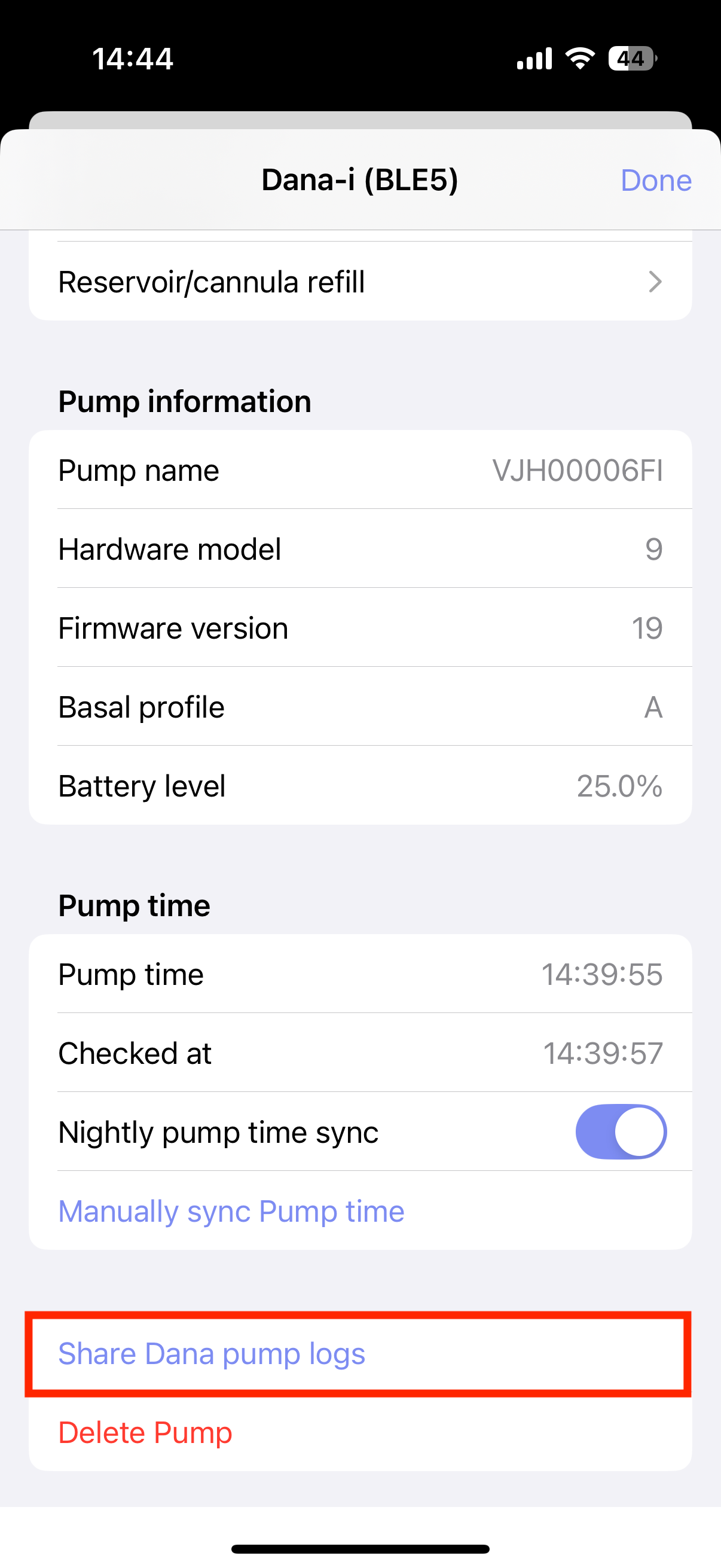
Q: Help I see double insulin entries in the Loop app
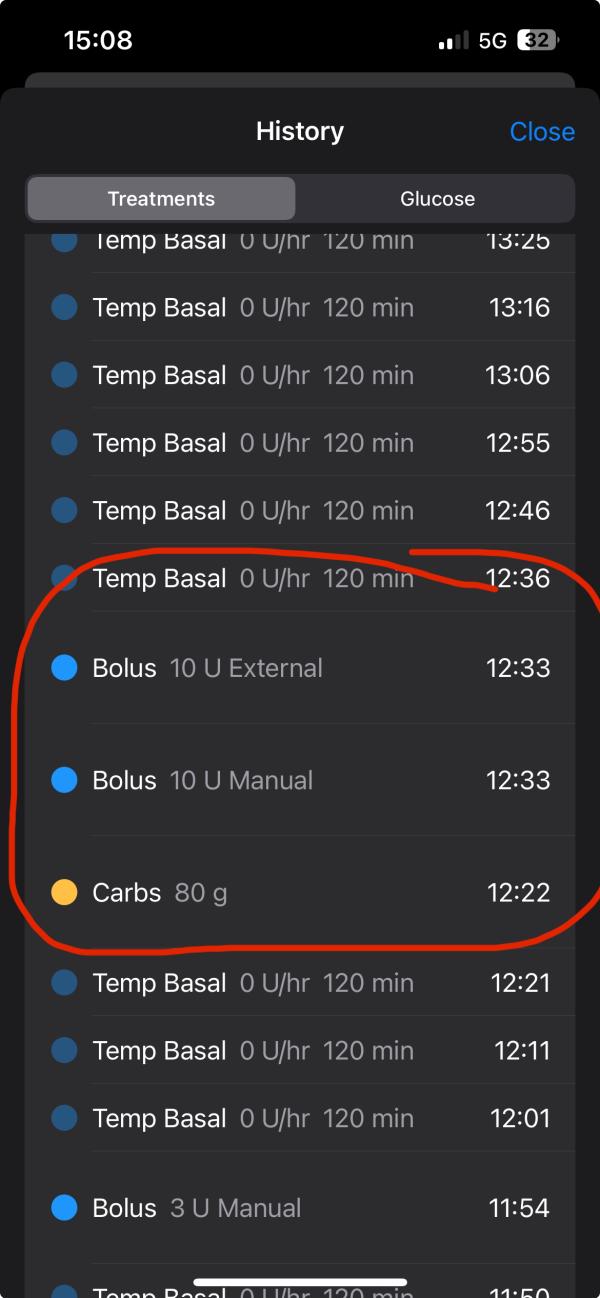
First, check the pump time against the time of your phone.
Go to the bottom of the pump settings and check if there is no bigger gap between Pump time and Checked at of 10 seconds.
If there is, use the Manual sync pump time button to fix the issue.
If this issue keeps happening, and the Nightly pump time sync feature is disabled, please re-enable it.
This feature is enabled by default and will sync the pump time during the first Loop cycle of the day (somewhere between 00:00 and 00:05).
This will prevent the time drift of the pump.
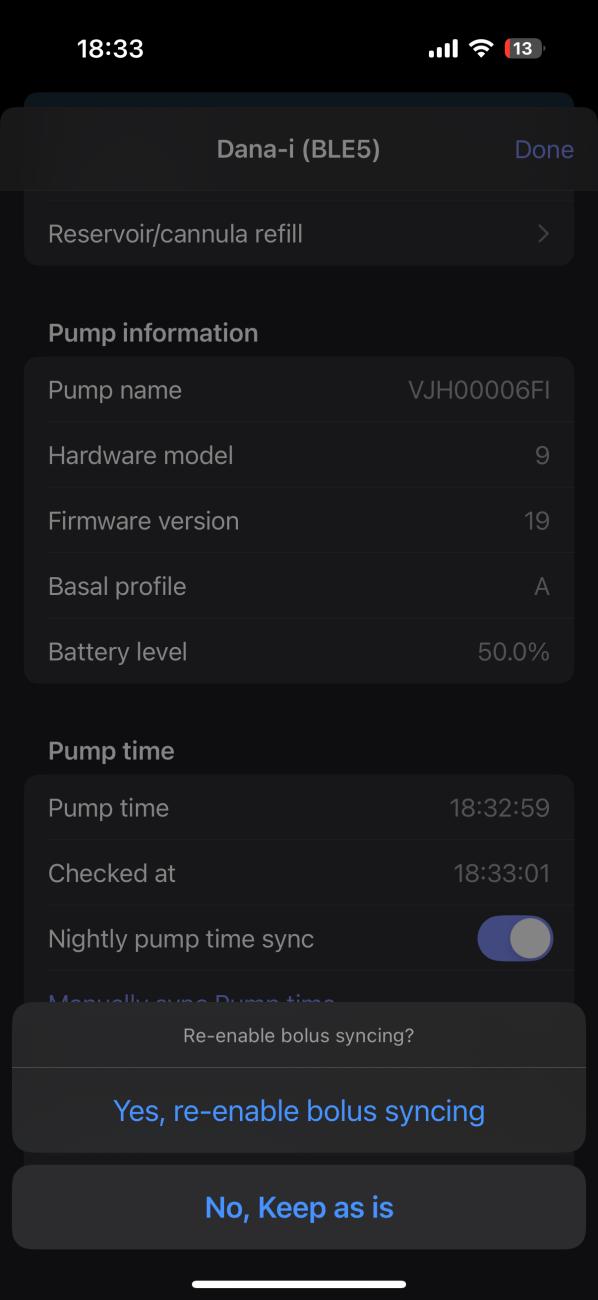
If the issue is still happening, you can disable Bolus syncing by long pressing the Battery level, and then disable the feature.
Please note, you will have to enter a bolus manually into the Loop app, whenevery you do a bolus outside the Loop app.
Disabling this feature will prevent the Dana driver of syncing a newly found bolus back to the Loop app.
Q: Help I just found out my pump screen doesn't work
First of all, do not panic :)
The Dana driver has a few tricks to work around this issue, but always check with your insurance or Dana distributor to see if you can get a replacement pump.
Now for the tricks, the Dana driver has the following available for you:
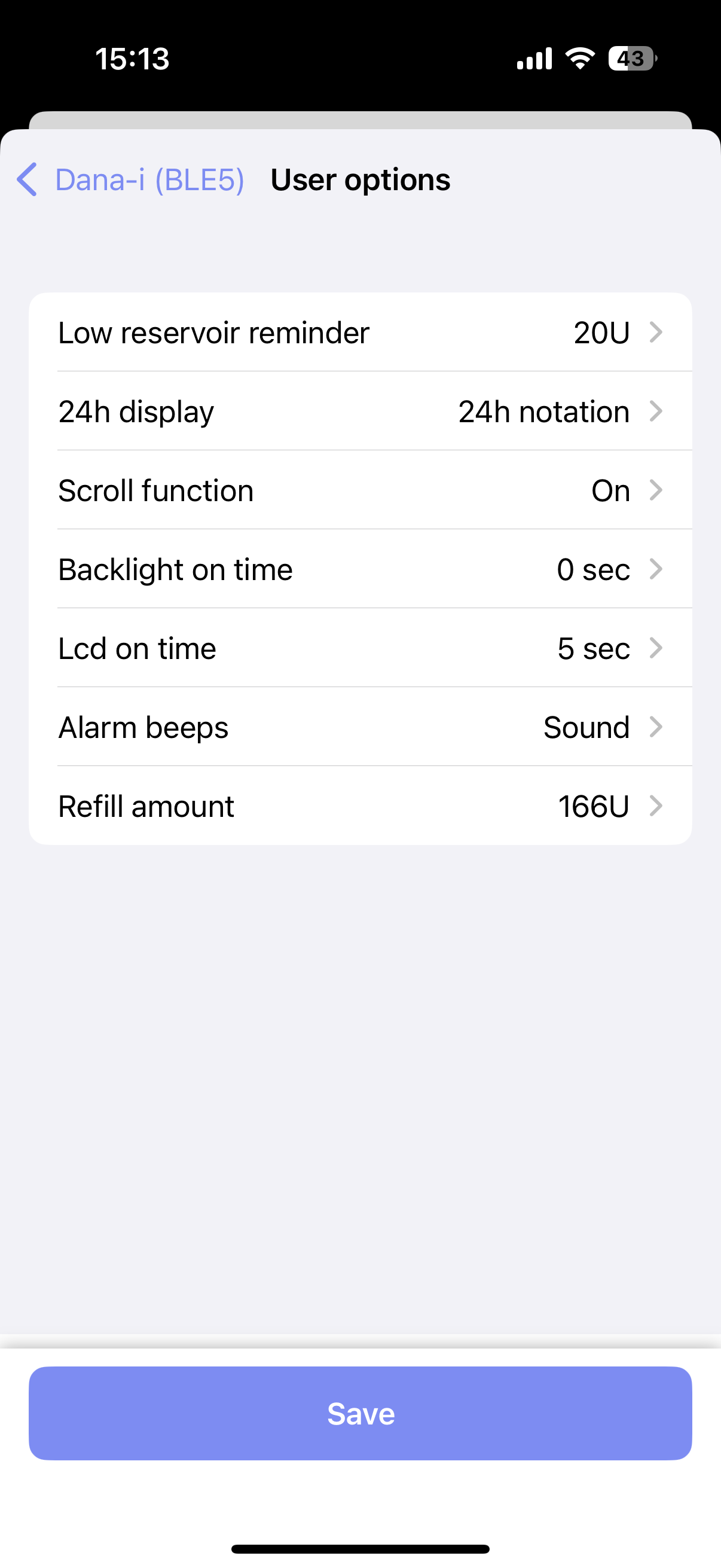
- All the user settings in the pump can be changed via the Loop app. Go to the pump settings -> User options to see all the settings which can be changed. You can check your display settings here, just to make sure the screen isn't broken, or you can your reservoir level for example.
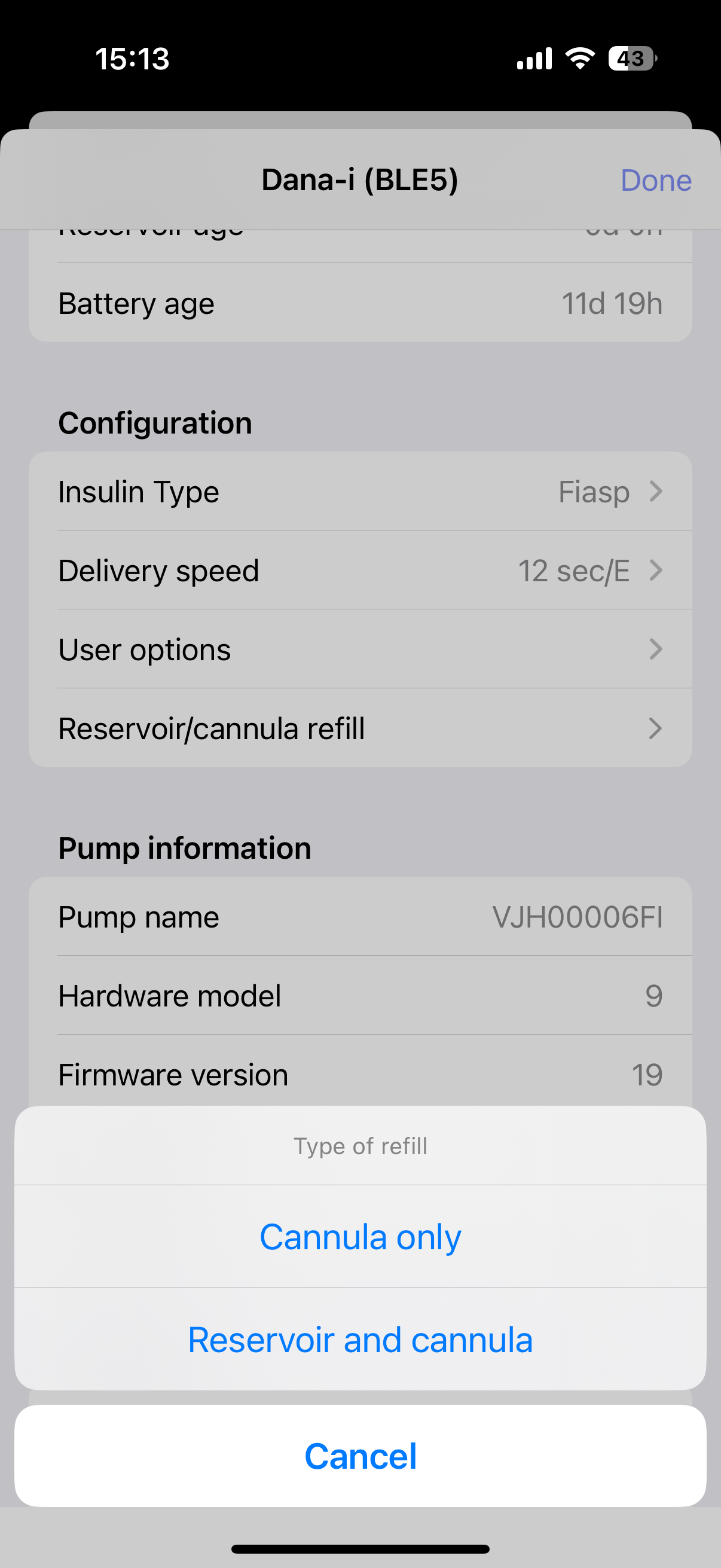
- The Dana driver also allow you to do blind reservoir refill or cannula changes. You will get a full wizard based on the type of refill you want to do!
Q: Why does the Dana pump not update my Bolus/Basal limits?
The dana pump only allows these limits to be read, not writen. You need to enter the doctor mode on the pump itself in order to update these limits.
How to enter Doctor mode?
First, you need to find the production day of your pump:
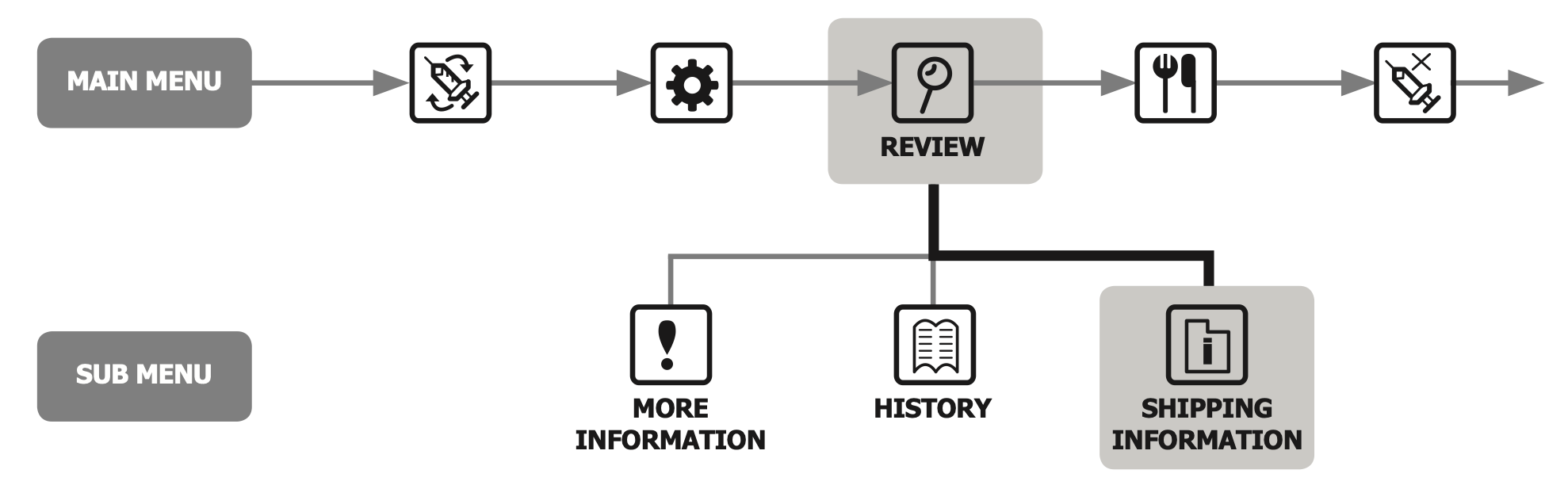
- Go to the main menu and enter Review
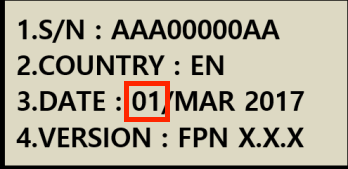
- Go to Shipping information and see the production date in item 3
Now, we can enter doctor mode:
- Make sure you are at the starting screen of your pump
- Now press the following three buttons at the same time: + (plus), - (minus), > (play)
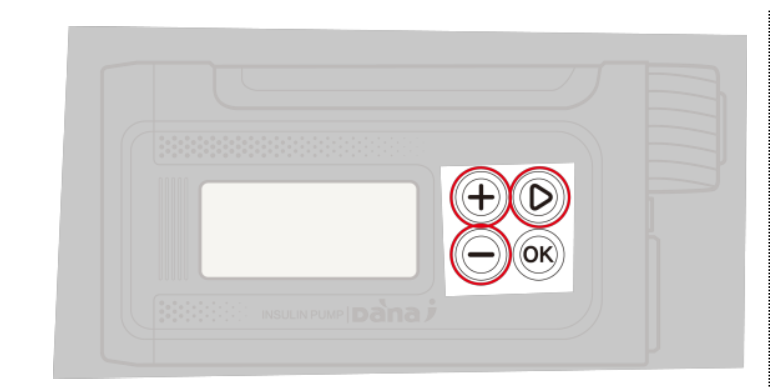
- Enter the following password: 30XY, where XY equals the production day of your pump
- You should have entered the Doctor mode. If nothing happend, you have entered your password incorrectly. Double check the production day or contact your Dana distributor.
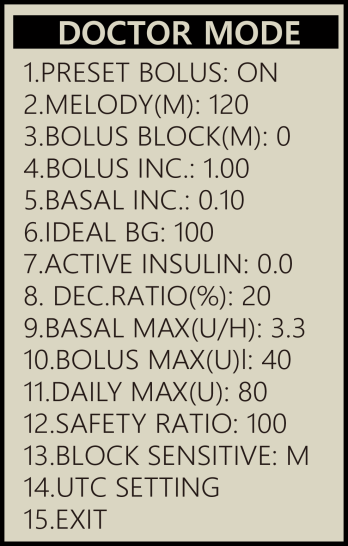
- The max basal limit is item 9 and the max bolus limit is item 10 in this menu
Q: Can I fully silence the pump?
Yes, the dana pump has a secret menu which allows you to fully silence the pump. The pump will not vibrate nor beep after every bolus.
First, make sure your pump has the correct alarm setting:
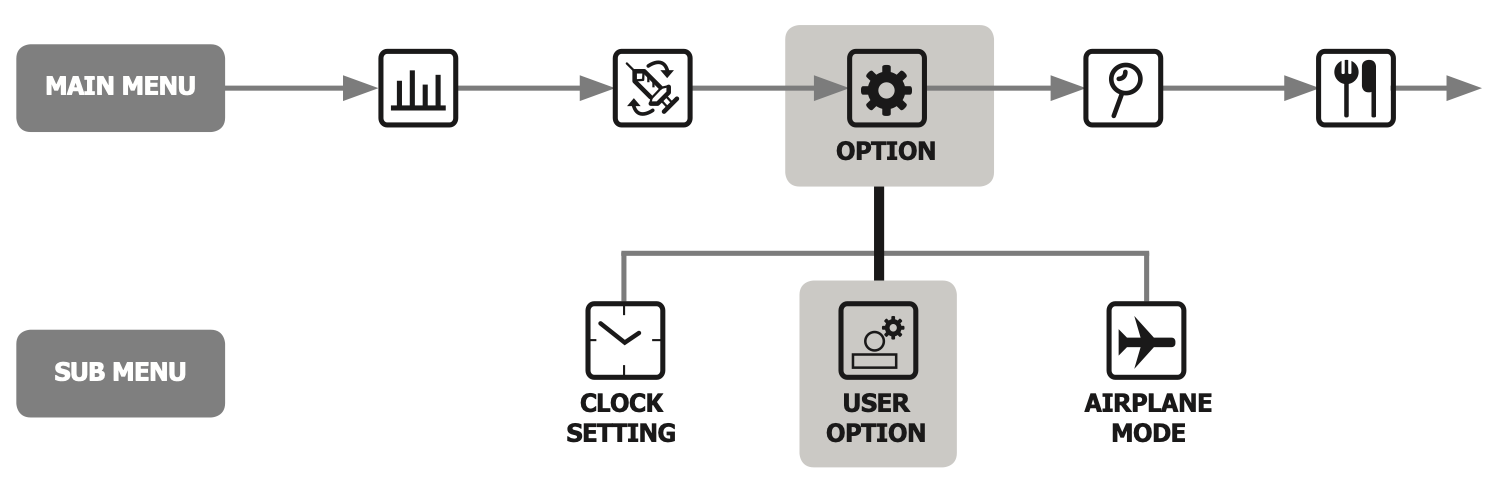
- Go to the main menu and enter Option
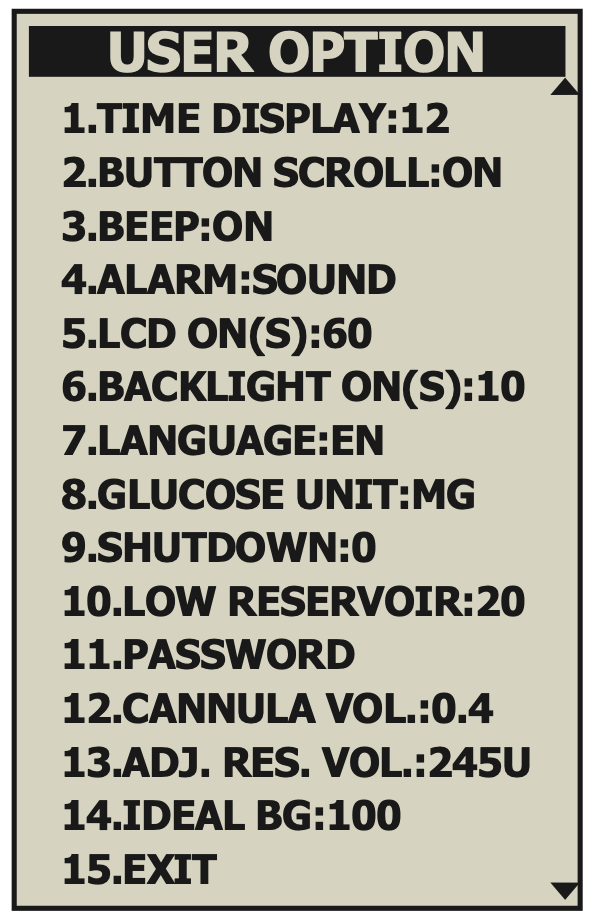
- Go to User Option and Scroll down to item 4 ALARM
- Make sure this setting is on Sound
Next, we need to go to Engineering mode:
Entering Engineering mode is dangerous!
You will be able to adjust very dangerous pump settings. DO NOT CHANGE THOSE!!! If you changed something else here, contact your Dana distributor to restore that setting
- Make sure you are at the starting screen of your pump
- Now press the following three buttons at the same time: + (plus), - (minus), > (play)
- Enter the following password: 1013, but make sure you enter the fourth digit first (3). Then enter the first digit second (1), the second digit (0), and finaly, enter the third digit (1). If done correctly, the pump will say: "Engineering mode pw" (or something similar)
- Now press the following three buttons again at the same time: + (plus), - (minus), > (play)
- Enter the following password: 1216, but make sure you enter the second digit first (2), follow this with the third digit (1), fourth digit (6), first digit (1).
- You should have entered the Engineering mode:
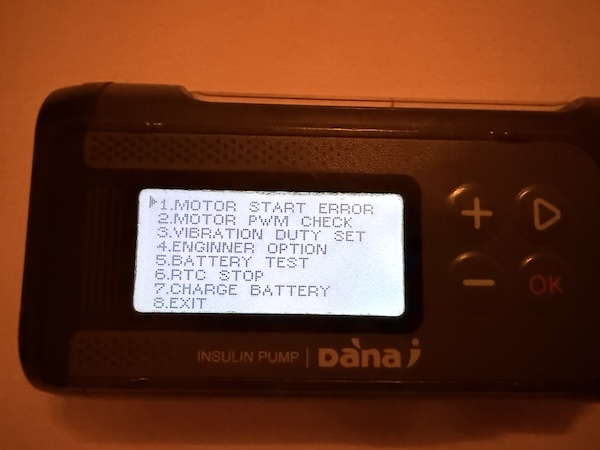
- Go to option 4 and set Silent mode to ON
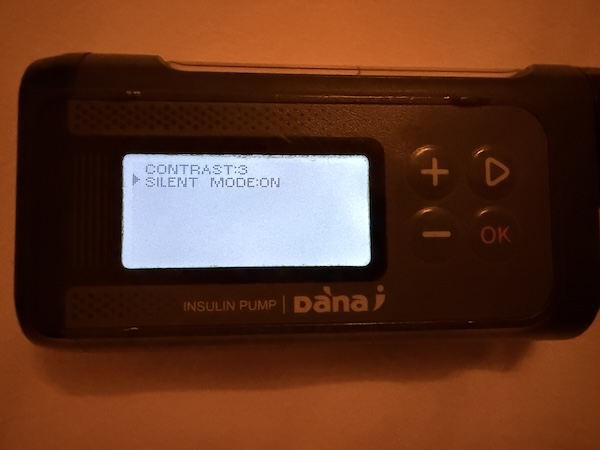
- Go back by pressing OK and use option 8 to leave the Engineering mode
Heartbeat modes
Background sound
An optional feature for Dana, useful when using a CGM without a heartbeat, is to play a silent audio to keep the Loop app active when in the background or when the phone is locked.
Normally, your CGM will have an active Bluetooth connection, which prevents the Loop app from being put into a suspended state. But when you use a CGM like NightScout remote CGM, Dexcom Share, etc, you rely on a active internet connection, and not on an active Bluetooth connection.
After you have onboarded the Dana pump, go to the pump settings.
-
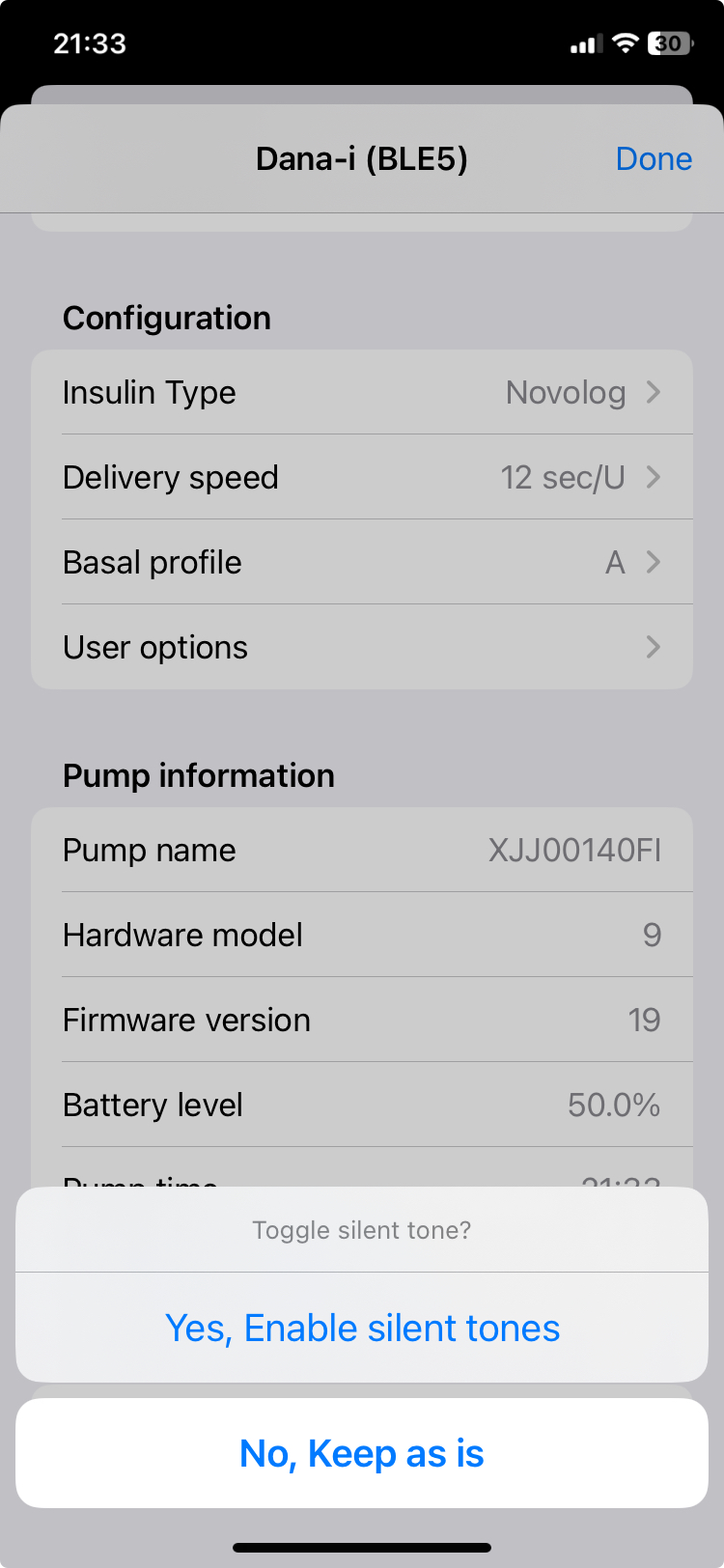
Scroll down to the "Pump name" and long-press this row.
- A modal should pop-up with the question, whether you want to toggle Silent tones.
- In order to activate this feature, the modal should say something like:
Yes, Enable silent tones. - When it says:
Yes, Disable silent tones, it will disable the background sounds.
-
Done! Every time you put the Loop app in the background or lock the phone, it will play a toneless sound, which prevents it from suspending the Loop app
- Warning - this will affect your phone battery life
Continuous bluetooth mode
This mode replicates how a CGM works: it keeps the bluetooth connection open even though no commands are being executed.
How to unblock the pump's UI
If you want to replace the reservoir or want to interact with the pump's UI, you have three options to temporarily disable Continuous bluetooth mode:
- Disable bluetooth on your phone (not recommended)
- Kill the Loop app (not recommended)
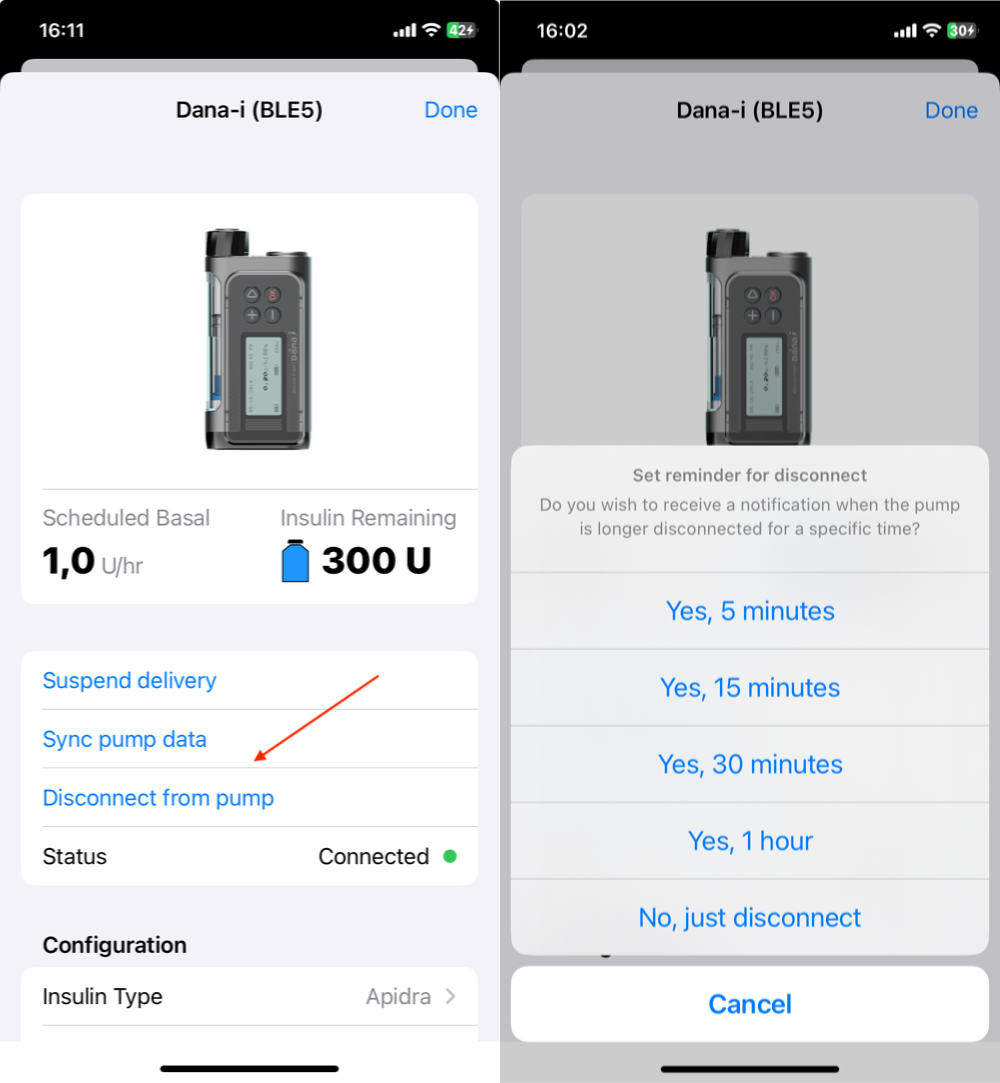
- Using the disconnect feature (recommended)
To use the disconnect feature, go to the Dana pump settings and use the Disconnect from pump button. You will get prompt to set a notification reminder. This reminder will be sent to you if you haven't reconnected the pump within the given time. This feature is fully optional, but is recommended.
How to enable Continuous bluetooth mode
Now that you know what the risks are of this feature and how to unblock the pump's UI, can we talk about enabling the feature.
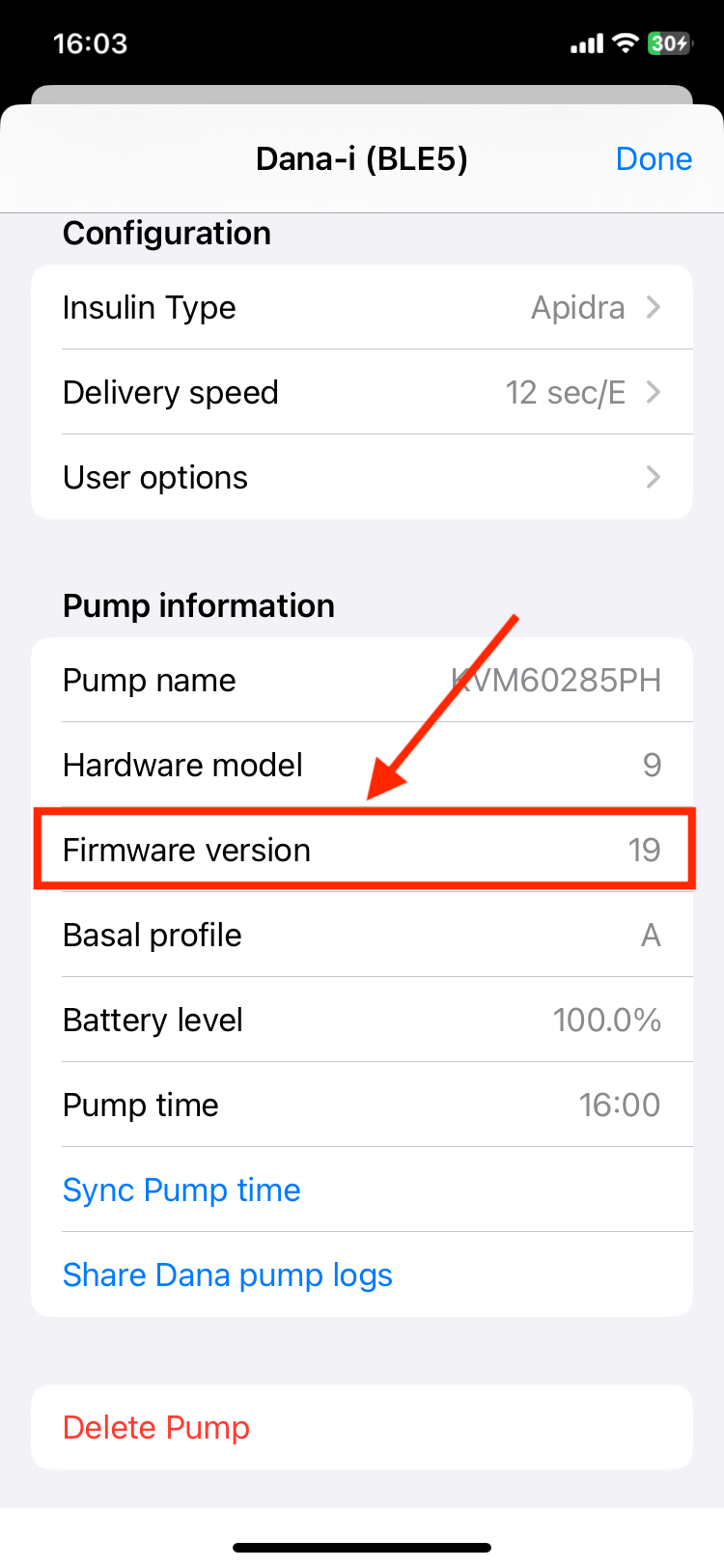
Go to the Dana settings and long press the Firmware version row.
You will be prompted to enable or disable the feature, choose Yes, Switch to continuous mode and the feature has been enabled!